New MikroTik hAP be³ Media: Wi-Fi 7 Router, Media Center, and Smart Home Hub
April 30, 2026
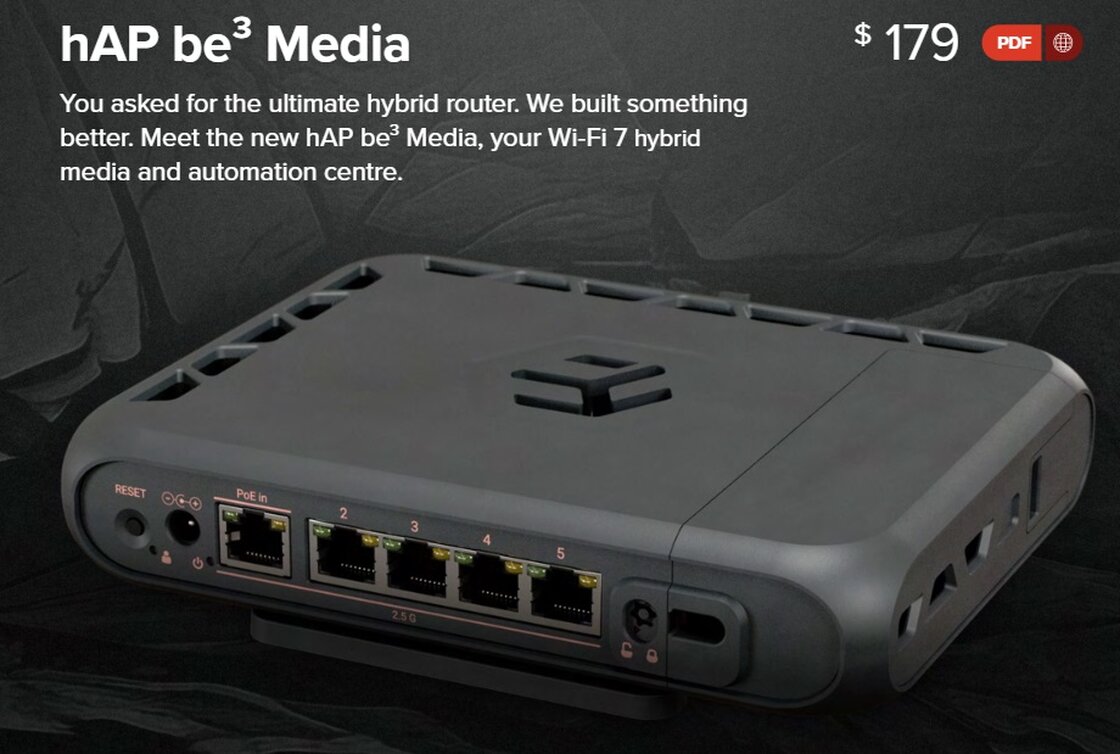
A very interesting new home networking device was announced by MikroTik in Newsletter #132 for April 2026 — the MikroTik hAP be³ Media.
Based on the announcement, this device is positioned not just as a regular home router, but as a complete hybrid media and automation center. It combines modern Wi-Fi 7, 2.5 Gigabit wired networking, local storage options, Bluetooth, Matter/Thread support, and Docker container functionality in one compact device. You can learn more about Docker containers on Mikrotik routers in this YouTube video.
Main features of MikroTik hAP be³ Media
The announced specifications include:
Why this router is more than just a router
What makes the hAP be³ Media especially interesting is the “Media” part of the name. With USB-C, two USB-A ports, and a microSD card slot, this device can potentially be used for local file storage, backups, media files, photos, surveillance footage, and other home or small office data. Instead of relying only on cloud services, some information can stay local, inside your own network. For users who care about privacy, this is a very important direction. A router that can also host small local services gives more control over where your data lives and how it is accessed.
Containers on MikroTik — explained in simple words
Containers sound complicated, but the basic idea is actually simple. A container is like a small isolated application running inside the router. Instead of installing a separate physical server, Raspberry Pi, or mini PC for every small service, some lightweight services can run directly on a MikroTik device that supports containers. For example, containers can be used for:
Smart home and Matter/Thread support
The hAP be³ Media also includes Bluetooth 5.4 and a built-in Matter/Thread radio. This makes the device very interesting for modern smart home installations. Matter and Thread are technologies designed to make smart home devices work together more reliably. In the future, this may help connect smart sensors, lights and other devices with less dependence on cloud services or separate hubs.
CAPsMAN and better roaming between access points
Another important MikroTik technology for homes and small businesses is CAPsMAN. CAPsMAN stands for Controlled Access Point System Manager. In simple words, it allows multiple MikroTik access points to be managed from one central place. Instead of configuring every access point separately, you can create one Wi-Fi configuration and apply it to all MikroTik APs in the network. This is very useful when a home or office needs more than one access point. For example, a larger house may have one access point in the basement, one on the first floor, and one upstairs. With CAPsMAN, all of them can broadcast the same Wi-Fi network name, use the same security settings, and be managed together. When configured properly, MikroTik Wi-Fi can also use roaming technologies such as 802.11r, 802.11k, and 802.11v. These technologies help client devices understand which access point is nearby and switch faster when you walk through the building. It is important to understand that roaming is not controlled only by the router. The phone, laptop, or tablet also makes its own decision about when to move from one access point to another. But with a properly designed MikroTik network — correct access point placement, good signal levels, clean channels, proper transmit power, and fast roaming features enabled — switching between access points can feel much smoother. This is especially useful for video calls, Wi-Fi calling, mobile devices, and homes where people move around while staying connected.
Professional MikroTik setup in the Philadelphia area
MikroTik equipment is powerful, flexible, and very cost-effective, but it is not always “plug and play.” The real value of MikroTik comes from proper configuration. Yuri’s Services provides MikroTik router and Wi-Fi configuration for homes, home offices, and small businesses in the Philadelphia area. We can help with:
Main features of MikroTik hAP be³ Media
The announced specifications include:
- Triple-band 2x2 MIMO Wi-Fi 7
- 5 × 2.5G Ethernet ports
- USB-C + 2 × USB-A ports
- microSD card slot
- Bluetooth 5.4
- Matter/Thread radio
- Quad-core ARM CPU up to 1.5 GHz
- PoE-in and DC power input
- Docker Container support
Why this router is more than just a router
What makes the hAP be³ Media especially interesting is the “Media” part of the name. With USB-C, two USB-A ports, and a microSD card slot, this device can potentially be used for local file storage, backups, media files, photos, surveillance footage, and other home or small office data. Instead of relying only on cloud services, some information can stay local, inside your own network. For users who care about privacy, this is a very important direction. A router that can also host small local services gives more control over where your data lives and how it is accessed.
Containers on MikroTik — explained in simple words
Containers sound complicated, but the basic idea is actually simple. A container is like a small isolated application running inside the router. Instead of installing a separate physical server, Raspberry Pi, or mini PC for every small service, some lightweight services can run directly on a MikroTik device that supports containers. For example, containers can be used for:
- DNS Filters
- Small web services
- Network tools
- MQTT brokers for smart home devices
- Local dashboards
Smart home and Matter/Thread support
The hAP be³ Media also includes Bluetooth 5.4 and a built-in Matter/Thread radio. This makes the device very interesting for modern smart home installations. Matter and Thread are technologies designed to make smart home devices work together more reliably. In the future, this may help connect smart sensors, lights and other devices with less dependence on cloud services or separate hubs.
CAPsMAN and better roaming between access points
Another important MikroTik technology for homes and small businesses is CAPsMAN. CAPsMAN stands for Controlled Access Point System Manager. In simple words, it allows multiple MikroTik access points to be managed from one central place. Instead of configuring every access point separately, you can create one Wi-Fi configuration and apply it to all MikroTik APs in the network. This is very useful when a home or office needs more than one access point. For example, a larger house may have one access point in the basement, one on the first floor, and one upstairs. With CAPsMAN, all of them can broadcast the same Wi-Fi network name, use the same security settings, and be managed together. When configured properly, MikroTik Wi-Fi can also use roaming technologies such as 802.11r, 802.11k, and 802.11v. These technologies help client devices understand which access point is nearby and switch faster when you walk through the building. It is important to understand that roaming is not controlled only by the router. The phone, laptop, or tablet also makes its own decision about when to move from one access point to another. But with a properly designed MikroTik network — correct access point placement, good signal levels, clean channels, proper transmit power, and fast roaming features enabled — switching between access points can feel much smoother. This is especially useful for video calls, Wi-Fi calling, mobile devices, and homes where people move around while staying connected.
Professional MikroTik setup in the Philadelphia area
MikroTik equipment is powerful, flexible, and very cost-effective, but it is not always “plug and play.” The real value of MikroTik comes from proper configuration. Yuri’s Services provides MikroTik router and Wi-Fi configuration for homes, home offices, and small businesses in the Philadelphia area. We can help with:
- MikroTik router setup
- Wi-Fi optimization
- CAPsMAN configuration
- Multiple access point networks
- VLANs
- Hotspots and guest Wi-Fi
- Firewall rules and security hardening
- VPN setup
- Troubleshooting unstable networks
- Container-based MikroTik services
- Wired and wireless network improvements